Claude Code Forks Every MCP Server Per Session. Here's How to Share Them.
My workstation started running out of memory, and it wasn’t from anything I was actually doing.
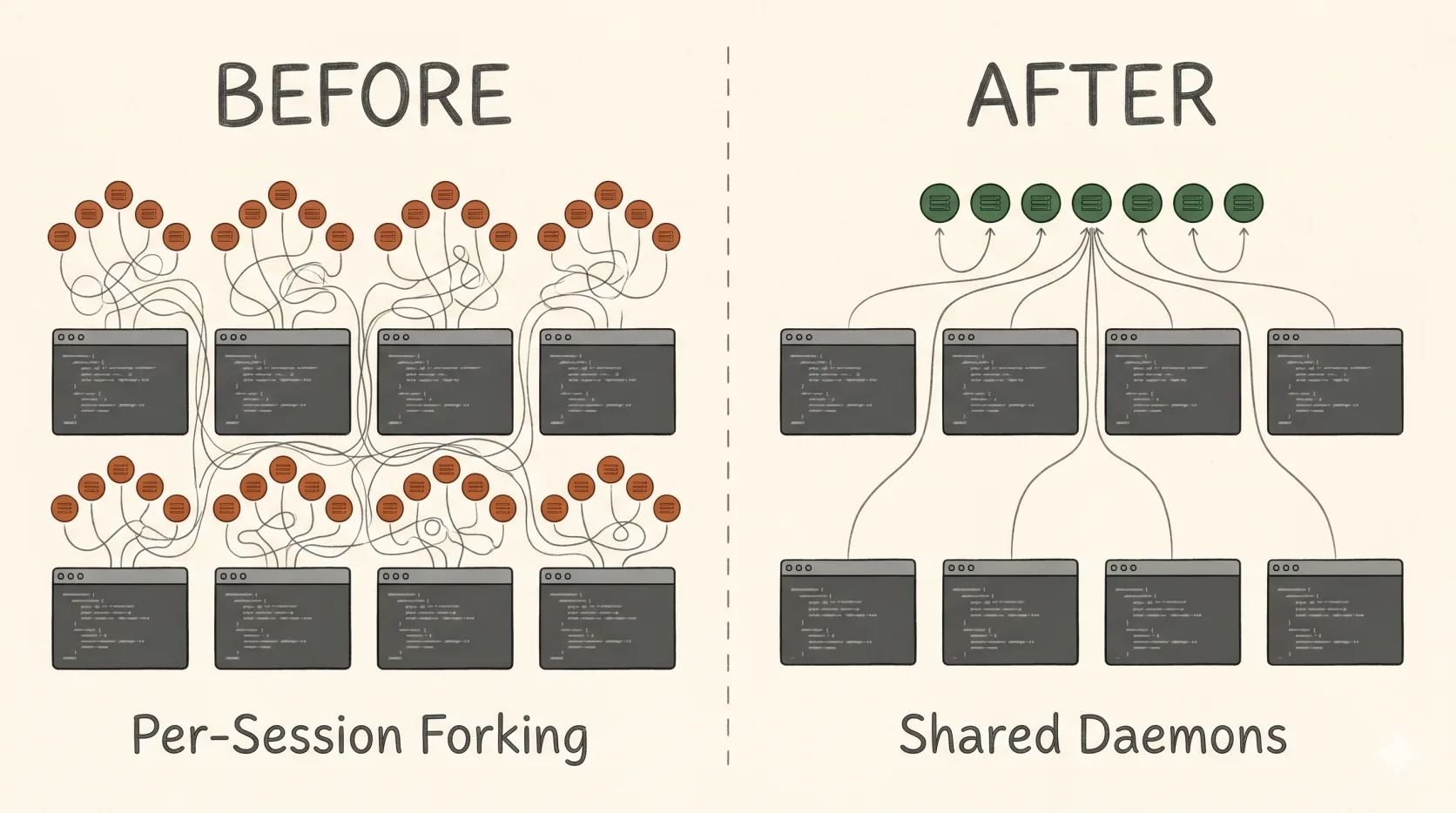
On a typical day I have somewhere between 10 and 30 Claude Code sessions open across different projects, and each of those sessions might spawn 5–20 subagents while doing real work. At some point I noticed htop was showing 20+ Node processes per session, each holding 150–300 MB. With five MongoDB MCP servers, Grafana, Playwright, and a handful of smaller integrations, one fresh session was costing me about 3 GB of RSS before I’d typed a single message. Multiply that by 20 sessions and the math gets ugly fast: 60 GB of resident memory just for the privilege of having Claude available.
The reason this happens is structural, and the fix takes about an afternoon. But there’s a particular trap along the way that crashed my daemon roughly 900 times over 24 hours before I caught it, and the obvious-looking adapter that causes it is recommended in plenty of places online. So this writeup is partly a guide and partly a warning.
Why every session forks its own MCP servers
MCP servers can speak three transports: stdio, sse (Server-Sent Events, legacy), and http (Streamable HTTP, current). Almost every off-the-shelf MCP defaults to stdio, which means the server runs as a child process of the MCP client — in this case, your Claude Code session. One client, one child.
When you start a Claude Code session, it does not wait until you call a tool to spin up the MCP server. It eagerly spawns every configured stdio MCP at startup, regardless of whether you ever use them. So an MCP you “rarely call” still costs you ~150 MB per session just for the privilege of being available. Run four sessions and you’ve forked the same MongoDB MCP four times, each with its own Node process, its own connection pool, its own cache.
One thing worth clarifying because the math depends on it: subagents don’t multiply the MCP fork count. When a session spawns a subagent via the Task tool, the subagent is a separate API conversation managed by the same Claude Code process — it routes its MCP calls back through the parent session’s existing children rather than spawning its own. I verified this by checking the process tree on a machine with 4 active sessions and only one Playwright child per session, no nested claude subprocesses anywhere. So whether a session has zero subagents running or twenty, the MCP process count for that session is the same. The multiplier you care about is sessions, not sessions × agents.
The transport itself is the constraint. stdio is inherently one-to-one. The other two transports listen on a port and can — in principle — serve many clients. The fix is to take MCPs that support a network transport and run them once as long-lived daemons, then point every Claude session at the same daemon over loopback.
A quick diagnostic I now keep around:
# Count MCP child processes for each running claude session
ps -eo pid,ppid,rss,args | grep -E "mongodb-mcp|playwright|firebase|mcp-server" | head

# Total RAM used by all node procs (MCP + claude internals)
ps -eo pcpu,pmem,rss,comm --no-headers | \
  awk '$4=="node" {s+=$3} END {printf "%.1f GB\n", s/1024/1024}'
If the same MCP package name appears N times where N matches your active session count, you have this problem.
What’s safe to share and what isn’t
Not every MCP wants to be shared. Two dimensions matter: does the server itself implement concurrent clients, and is the workload stateless from the client’s POV.
A MongoDB MCP serving read-only queries against a cluster: trivially shareable. A Grafana MCP forwarding API calls: shareable. A GitHub or Notion MCP backed by a remote SaaS: already shared, you’re just hitting their API.
A Playwright MCP that holds an open browser with tabs and cookies: do not share. One session navigating to example.com would clobber another session’s tab. Same for anything that holds mutable per-client state — REPLs, interactive auth flows, anything that opens a long-lived file handle on your behalf. Firebase CLI is in this bucket because it goes through an OAuth login flow that mutates local credentials.
The rule of thumb I’ve settled on: native HTTP transport + read-only workload = share; stdio-only or stateful = leave it as a per-session fork.
When in doubt, check --help on the MCP server binary. Most current servers that are designed for sharing have a flag like --transport http or -transport sse. If the only transport option is implicit stdio, the server probably wasn’t designed for concurrent clients and you should treat it accordingly.
The supergateway trap
This is the part I want to spend the most time on, because it nearly killed the whole project.
If you go searching for “share an MCP server” you’ll find plenty of suggestions to wrap a stdio MCP with supergateway, which advertises itself as a stdio-to-SSE bridge. The shape is appealing: take any stdio MCP, run supergateway --stdio "<command>", and it exposes an SSE endpoint that multiple clients can connect to. Universal adapter, problem solved.
It is not. Supergateway in --stdio mode is single-client by default. Read its source and you’ll see it creates exactly one Server instance and one stdio child process at startup, then loops over all connected SSE sessions broadcasting that single child’s output to every one of them. The Server/Protocol instance is shared across every transport. The MCP SDK throws Already connected to a transport. Call close() before connecting to a new transport the moment a second concurrent client opens a session. The daemon crashes. systemd restarts it. The next session connects, briefly succeeds, then the third concurrent client crashes it again.
(There are --minConcurrency and --maxConcurrency flags as of v3.3 that pool multiple stdio children to work around this, but the v3.4 release notes explicitly say the concurrency code was rolled back to v3.2.0 behavior because it was unstable on some servers. So as of now, plain supergateway --stdio "<cmd>" is still single-client and the flags carry a “here be dragons” caveat.)
I ran like this for a day before I went looking. The symptoms were:
- Intermittent HTTP 503 errors in Claude Code (
No active SSE connection for session) systemctl --user show -p NRestarts --value mcp-fooreturning numbers in the hundreds- Journals full of
Already connected to a transporterrors
When I finally checked NRestarts, the service had been restarting roughly every 90 seconds for 24 hours. The reason I didn’t notice sooner is that systemd happily masks crash loops as long as the service eventually comes back up, and the failures only happened when two of my sessions tried to use the same MCP at the same time — which felt like a flaky tool, not a misconfigured daemon.
The lesson: for sharing, the bridge has to give each client its own MCP Server instance, even if the underlying stdio child is shared. That’s the bug supergateway has and the bug a working adapter has to avoid. If you need to share an MCP that’s stdio-only, mcp-proxy is the option I’d reach for. It also runs one stdio subprocess per configured server (not one per HTTP client — I had this wrong initially), but it instantiates a fresh Server per incoming connection and multiplexes requests through the shared stdio child via JSON-RPC request IDs. That’s enough to make it multi-client-safe in a way supergateway isn’t. More moving parts than leaving the MCP as stdio in .mcp.json, but worth it if the MCP is heavy and you have many sessions hitting it.
For everything else, prefer MCPs that natively implement HTTP or SSE. mongodb-mcp-server, mcp-grafana, postgres-mcp — all have a transport flag. Use it.
The setup
The shape of the solution is: each shareable MCP runs as a systemd-user service listening on a loopback port, and your .mcp.json points at http://localhost:<port> instead of running a command.
I keep everything under ~/.config/mcp/ for env files and ~/.config/systemd/user/ for unit files. One port per shared MCP, conventionally in the 8001–8099 range.
mkdir -p ~/.config/mcp && chmod 700 ~/.config/mcpSecrets go in env files with mode 600, not in unit files (which default to world-readable) or in .mcp.json (which often lives in a git repo):
# ~/.config/mcp/mongo-prod.env
MDB_MCP_CONNECTION_STRING=mongodb+srv://user:pass@host/db
chmod 600 ~/.config/mcp/*.envA typical unit file for an MCP with native Streamable HTTP support:
# ~/.config/systemd/user/mcp-mongo-prod.service
[Unit]
Description=MCP mongo-prod (Streamable HTTP on :8001)
After=network-online.target
Wants=network-online.target

[Service]
Type=simple
EnvironmentFile=%h/.config/mcp/mongo-prod.env
Environment=NPM_CONFIG_PREFER_OFFLINE=true
Environment=NPM_CONFIG_FUND=false
Environment=NPM_CONFIG_UPDATE_NOTIFIER=false
ExecStart=/usr/bin/npx -y mongodb-mcp-server@latest \
  --readOnly --transport http --httpPort 8001 --httpHost 127.0.0.1
Restart=on-failure
RestartSec=5
StartLimitBurst=5
StartLimitIntervalSec=120
StandardOutput=journal
StandardError=journal

[Install]
WantedBy=default.target
The StartLimitBurst and StartLimitIntervalSec lines are not optional. Without them, a broken unit will crash-loop forever, filling journals, burning CPU, and — as I learned — racking up 900 restarts overnight. With them, systemd marks the unit failed after 5 restarts in 2 minutes and stops trying, which is exactly the behavior you want when something is wrong.
The other gotcha hidden in that unit file is the --transport http flag. Many MCPs default to stdio even when you pass them a port and host. The daemon will start “successfully,” bind the TCP socket, and accept connections — but it’s talking stdio to a process that doesn’t exist on the other end, so no MCP traffic flows. From the outside it looks like the server is up and silently broken. Always set the transport flag explicitly, and always smoke-test the handshake before you trust it.
For Streamable HTTP servers, the smoke test:
curl -sS -X POST http://127.0.0.1:8001/mcp \
  -H "Content-Type: application/json" \
  -H "Accept: application/json, text/event-stream" \
  -d '{"jsonrpc":"2.0","id":1,"method":"initialize",
       "params":{"protocolVersion":"2024-11-05",
                 "capabilities":{},
                 "clientInfo":{"name":"smoketest","version":"1.0"}}}'
You should get back JSON-RPC with "serverInfo":{"name":"..."} and a capabilities object. If you get nothing, the daemon is in stdio mode despite binding the port. If you get connection refused, the daemon crashed — check journalctl --user -u mcp-mongo-prod -n 50.
For an SSE server (mcp-grafana and similar), use a streaming GET:
timeout 3 curl -sN -H "Accept: text/event-stream" http://localhost:8010/sse | head -3You should see event: endpoint followed by data: /message?sessionId=.... If you used curl -I (HEAD) and got back a 405, that’s a red herring — SSE endpoints only accept GET. The 405 doesn’t mean the server is broken.
Once the smoke tests pass, the last step is to rewrite .mcp.json to point at the daemons instead of running commands. The type field and the URL path both matter, and getting either wrong produces the same misleading error message.
| Server transport | .mcp.json entry | URL path |
|---|---|---|
| Streamable HTTP | "type": "http" | usually /mcp |
| SSE | "type": "sse" | usually /sse |
| stdio (per-session) | "command" + "args", no type | n/a |
{
  "mcpServers": {
    "mongo-prod": {
      "type": "http",
      "url": "http://localhost:8001/mcp"
    },
    "grafana": {
      "type": "sse",
      "url": "http://localhost:8010/sse"
    },
    "playwright": {
      "command": "npx",
      "args": ["-y", "@playwright/mcp@latest"]
    }
  }
}
If you mismatch the type and the actual transport — say, "type": "http" pointing at an SSE server, or the wrong URL path — Claude Code’s /mcp command will show “not authenticated” or “No active SSE connection for session”. These look like auth errors and they have absolutely nothing to do with auth. They’re generic init-handshake failures from a client speaking the wrong protocol to the server.
To autostart on boot before any login, enable systemd-user lingering:
sudo loginctl enable-linger $USER
loginctl show-user $USER | grep Linger   # should say Linger=yes
With linger enabled and WantedBy=default.target in the units, daemons come up at boot and your sessions just find them already running.
The macOS equivalent
Everything above assumes Linux + systemd, because that’s the box I run Claude Code on. The same architecture works fine on macOS — you just swap systemd-user for launchd. The pieces map one-to-one: unit file → .plist in ~/Library/LaunchAgents/, EnvironmentFile → either inline EnvironmentVariables (avoid for secrets) or a tiny wrapper script that sources an env file then execs the MCP, loginctl enable-linger → built in (LaunchAgents start at login by default, or system-wide via ~/Library/LaunchDaemons/ if you need pre-login startup), Restart=on-failure → KeepAlive, StartLimitBurst → ThrottleInterval.
A working ~/Library/LaunchAgents/com.user.mcp.mongo-prod.plist for the same MongoDB MCP example:
<?xml version="1.0" encoding="UTF-8"?>
<!DOCTYPE plist PUBLIC "-//Apple//DTD PLIST 1.0//EN"
 "http://www.apple.com/DTDs/PropertyList-1.0.dtd">
<plist version="1.0">
<dict>
  <key>Label</key>
  <string>com.user.mcp.mongo-prod</string>
  <key>ProgramArguments</key>
  <array>
    <string>/bin/sh</string>
    <string>-c</string>
    <string>. $HOME/.config/mcp/mongo-prod.env && exec /opt/homebrew/bin/npx -y mongodb-mcp-server@latest --readOnly --transport http --httpPort 8001 --httpHost 127.0.0.1</string>
  </array>
  <key>RunAtLoad</key>
  <true/>
  <key>KeepAlive</key>
  <dict>
    <key>SuccessfulExit</key>
    <false/>
  </dict>
  <key>ThrottleInterval</key>
  <integer>30</integer>
  <key>StandardOutPath</key>
  <string>/tmp/mcp-mongo-prod.log</string>
  <key>StandardErrorPath</key>
  <string>/tmp/mcp-mongo-prod.log</string>
</dict>
</plist>
The sh -c '. envfile && exec ...' shim is the cleanest way to get systemd-style EnvironmentFile semantics out of launchd without putting secrets in the plist itself (which ends up world-readable under ~/Library/LaunchAgents/). Load it with launchctl bootstrap gui/$(id -u) ~/Library/LaunchAgents/com.user.mcp.mongo-prod.plist, unload with launchctl bootout, and check status with launchctl print gui/$(id -u)/com.user.mcp.mongo-prod. The ThrottleInterval is launchd’s equivalent of the systemd restart throttle — without it, a broken plist will respawn aggressively and burn CPU the same way a broken systemd unit will.
If launchd feels like more ceremony than you want for a personal setup, pm2 or a tmux session running the daemons by hand both work. You give up the boot-time persistence and crash-throttling that launchd gives you for free, but for a single-user workstation it’s a defensible tradeoff.
What it actually saves
The fixed daemon cost for my setup — five MongoDB MCPs, Grafana, and an analytics MCP — is about 3 GB. That’s roughly the same as one full per-session fork. So at one concurrent session, sharing is slightly worse than forking, because the daemons are always running even when no session needs them. Break-even is around two sessions. Above that, the win compounds linearly.
| Concurrent sessions | Per-session forks | Shared daemons + lean sessions | Saved |
|---|---|---|---|
| 1 | 3.3 GB | 3.6 GB | -0.3 GB |
| 2 | 6.6 GB | 4.2 GB | +2.4 GB |
| 4 | 13.2 GB | 5.4 GB | +7.8 GB |
| 8 | 26.4 GB | 7.8 GB | +18.6 GB |
| 15 | 49.5 GB | 12.0 GB | +37.5 GB |
| 30 | 99.0 GB | 21.0 GB | +78.0 GB |
The shape of that table is the actual point. The fixed daemon cost is paid once regardless of how many sessions you run, while per-session forking is linear in N. At my usual workload — somewhere between 10 and 30 concurrent sessions — the savings are the difference between the machine being usable and the OOM killer making decisions about which session dies first. If you only ever run one Claude session at a time, none of this is worth doing. If you run several concurrently, the savings cross into “more headroom for the actual work” pretty quickly.
Things I wish I’d known sooner
Three things stand out as worth internalizing if you’re about to do this.
Multi-client capability is a property of the server’s implementation, not its transport. Speaking SSE on a port does not automatically make a server multi-client. The real test is reading the server’s source or docs, and then opening a real second concurrent connection and watching what happens. If the second client gets Already connected to a transport, you have a single-client server pretending to be a multi-client one.
The handshake errors lie about what they are. “Not authenticated” and “No active SSE connection for session” are what Claude Code shows you when the init-handshake fails for any reason — wrong transport type, wrong URL path, server in stdio mode, server crashed mid-handshake. Don’t assume an auth error means there’s an actual auth problem. Smoke-test the daemon with curl first; if that works, the server is fine and the .mcp.json entry is wrong.
Check NRestarts early and often. A healthy daemon stays at 0. If systemctl --user show -p NRestarts --value <svc> returns anything north of 5 within the first hour of startup, you have a silent crash loop. Without StartLimitBurst in the unit, systemd will happily restart a broken service thousands of times before anything visible breaks. With it, you find out within two minutes.
The whole setup took me about an afternoon to get right, including the day I lost to the supergateway crash loop. It’s worth the time if you run multiple Claude sessions concurrently — the memory you free up is memory the AI doesn’t have to compete with everything else on the machine for, and there’s no downside to having more headroom.
If you only ever run one session at a time, just leave everything as stdio. The eager-fork model is fine for that case, and the operational overhead of running daemons isn’t worth what you’d save.
Comments
Reply on Bluesky here to join the conversation.