Building PadelIQ: Padel Match Analysis That Never Uploads Your Video
Walk past any padel court and you’ll see the same thing: a phone propped against the back glass, recording. Players film their matches all the time. Then the clip sits in the camera roll, gets watched once, maybe gets sent to the group chat, and that’s it.
Meanwhile a coaching lesson costs €40–80 an hour, and the thing a coach tells you in the first five minutes is almost always about positioning: you’re hanging in no-man’s land, you and your partner keep leaving the middle open, you never actually get to the net. Those are things you can’t feel while playing, but they’re obvious when you watch from behind the court.
That gap — footage everyone already has, feedback nobody gets — is what PadelIQ is for. Film one rally, and in under a minute you get a positioning heatmap for each player, a few hard numbers, and the top three things to fix.
The Problem With Uploading Video
The obvious architecture is the one every sports-analysis app uses: upload the clip, run the models on a GPU in the cloud, send back results.
I didn’t want to build that, for two reasons.
The first is privacy, and it’s not abstract here. You’re filming four people, and three of them didn’t install your app. Shipping their faces to a server so you can learn about your footwork is a bad trade, and it’s the kind of thing that makes people hesitate to film at all. “Videos never leave your iPhone” is a sentence I wanted to be able to put on the App Store screenshot and mean literally.
The second is economics. Frame-upload architectures cost somewhere between $0.60 and $5 per user per month in compute and egress before you’ve paid for anything else. On-device, the marginal cost of an analysis is roughly a cent — the user’s phone does the work, and the user’s phone is already very good at it. That difference is what makes a €60/year subscription viable for a solo developer, and eventually makes a free tier possible.
So the constraint became: the entire computer vision pipeline runs on the phone. The only thing that’s allowed to leave the device is numbers.
Can an iPhone Even See Through the Glass?
Before writing any app code I spent a few days on a feasibility spike, running candidate pipelines over real match footage on a Mac.
The first result was a nasty surprise. Apple’s built-in Vision detectors — VNDetectHumanBodyPoseRequest and VNDetectHumanRectanglesRequest — find the two near-side players fine and find nothing on the far side. The far players are seen through the net mesh, and that’s enough to blind them completely. Cropping and upscaling didn’t help. A human looks at the frame and sees four people without effort; Vision sees two.
The fix was swapping in YOLOv8n, exported to Core ML with stock COCO weights. No fine-tuning. It detects all four players, with far-side confidence around 0.80–0.86 through the mesh and 0.90+ for the near side. Detection count on the same test clip more than doubled. Warm inference was about 31 ms per frame on CPU alone, and the full pipeline ran at 11× realtime — well inside the “under a minute per clip” budget I wanted, with the Neural Engine still untouched.
That spike also produced the filming rules that ended up in the app’s guide, because each one corresponds to a way the pipeline breaks:
- Landscape only. Portrait cuts off both side walls, and the court lines are the calibration.
- The 1× camera, not 0.5×. Ultra-wide and GoPro lenses bow the court lines, and a bowed line breaks the homography.
- 1080p if you can. Far-side players are small and behind a mesh; they need the pixels.
- Prop it and don’t touch it. The analysis is tied to one camera position for the entire clip.
The Pipeline
Everything lives in a local Swift package called PadelKit, separate from the app, so it can be tested in isolation. The pipeline is five stages: decode → detect → project → track → stats.
Decode. AVFoundation pulls frames at 5 fps. That sounds low, but for player positioning it’s plenty — people don’t teleport — and it keeps the frame budget small.
Detect. Each frame goes through YOLOv8n via VNCoreMLRequest with compute units set to .all, so it lands on the Neural Engine. A player’s ground point is the bottom-centre of the bounding box. Two filters were load-bearing: throw away any box that touches the bottom edge of the frame (clipped feet put the ground point about two metres too deep), and throw away anything that projects more than 0.8 m outside the court (spectators, the neighbouring court).
Project. A homography maps image pixels onto a real padel court: 10 × 20 metres, net at the halfway line, service line 6.95 m from the net. The user confirms it once by tapping four reference points — and here the spike taught me something about UX too. The textbook approach is “tap the four corners,” but from a phone propped against the back glass, the near corners are usually out of frame. So the glass-mount preset uses the two net post bases, the T-junction where the service line meets the centre line, and the base of the far glass instead. Calibrations are saved as venue presets, so the second time you play at “Racket Club, Court 3” there’s nothing to tap.
Track. Greedy nearest-neighbour matching in court-space metres, with a gate that widens the longer a track has gone unseen. Plus one hard rule that removed most identity swaps for free: a track can never cross the net. Players don’t change sides mid-rally.
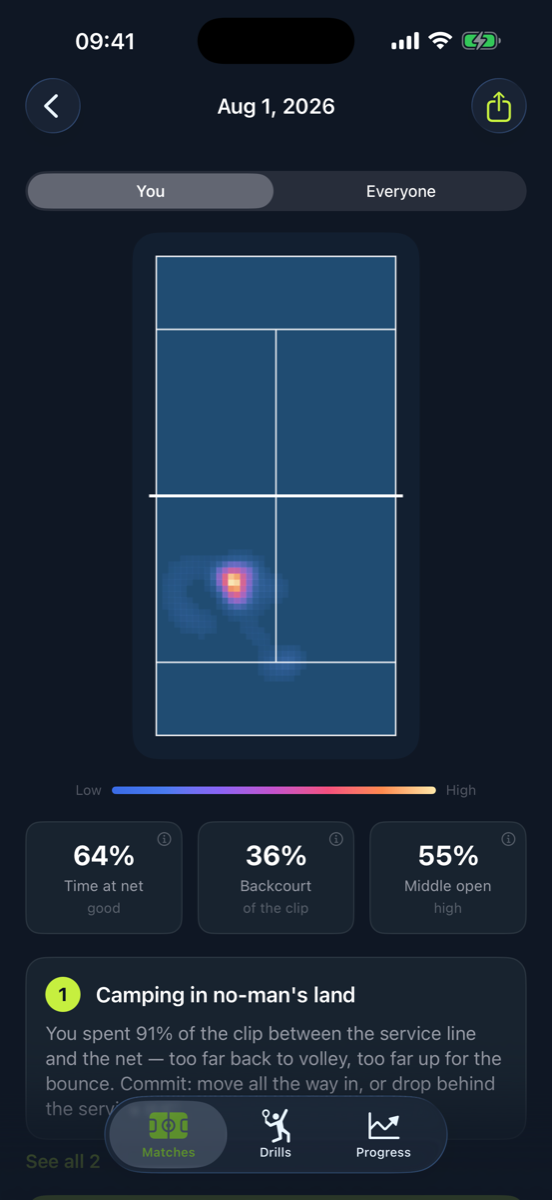
Stats. Time in the net zone, time in the backcourt, average position, coverage in distinct square-metre cells — and for the team, the one everyone cares about: how often was the middle corridor left open? That’s computed over half-second buckets by asking whether anyone from the team was in the 3-metre band down the centre.
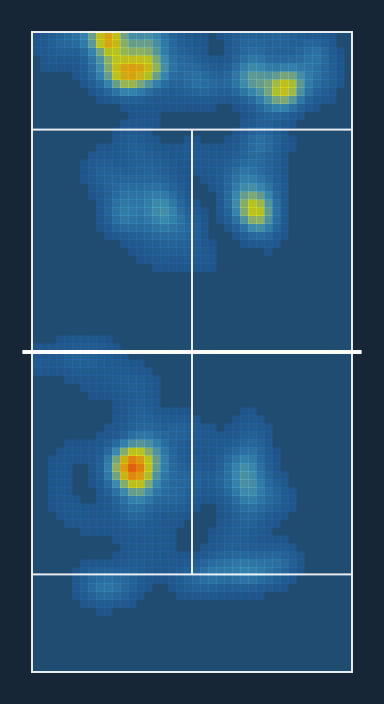
The heatmap is rendered on-device as well: 0.25 m cells, a Gaussian splat per observation, drawn over a court diagram. I re-cut the default jet colormap into a perceptually ordered blue → cyan → yellow → red ramp, because that ramp is effectively the brand.
The Verdict, and the No-Horoscope Rule
Heatmaps are nice. What people actually want is to be told what to do. And this is where most “AI coach” products fall apart, because they hand the whole thing to an LLM and get back advice that would be true of anyone: “Try to communicate with your partner and work on your net game.”
The rule I wrote down early and kept returning to: if the sentence would be true for a different player’s clip, delete it.
That rule is enforced structurally, not by prompt engineering. The verdict generator is deterministic and local — five rules (middle-open, no-mans-land, net-presence, coverage-imbalance, static-positioning), each with thresholds on the measured stats, a severity score, and the drill tags it maps to. The top three by severity are the verdict. At that point the app already has everything it needs and could ship a perfectly serviceable templated sentence.
The one cloud step is wording. The app sends only numbers — the weakness IDs and the stats behind them, plus the user’s language — to a single Cloud Function in europe-west1, which asks Claude Haiku to rewrite them in a coach’s voice with a JSON schema constraining the output. The response is merged back by weakness ID. Severity and drill tags never leave the device, the model isn’t allowed to add or remove a weakness, and if the call times out, comes back malformed, or you’re offline, the app silently keeps the local template. The numbers are identical either way.
The function’s system prompt says it from the other side: the model never decides what the weaknesses are. That stays on the phone.
The same discipline applies to analytics: the tracking wrapper is annotated “numbers and flags only — never video, positions, or anything from the clip itself.” There’s no account, no sign-up, no server-side profile. Deleting the app deletes everything.
Small Things That Mattered
Warm up Core ML before the user is watching. The first inference compiles the model graph, and on a cold start that stalls the progress ring for several seconds — which reads as “broken.” The app now runs a throwaway 64×64 inference from the screens leading into analysis, so by the time the user taps “Analyse,” the model is warm.
Make the progress bar the data. The analysing screen shows the court filling with real heatmap density as tracking data arrives. It’s not a fake animation; it’s literally the result forming. A determinate ring is driven by frames processed, and backgrounding pauses rather than restarts.
Ship a sample match, not sample footage. First-time users can see a pre-analysed demo before filming anything. It’s a stored JSON fixture plus rendered heatmaps. The source video isn’t bundled — the measurements are mine to ship, the footage isn’t.
Store assets as code. Forty-two screenshots across seven locales, plus app preview videos, are produced by a script that drives the debug build on a simulator via launch arguments, then composites everything with Remotion. Changing a caption is a one-line edit and a re-render.
What’s Next
The current app does players only — no ball, no shots, no score. A second spike on ball tracking was more nuanced: with the detection threshold lowered to 0.01 and static false positives suppressed (spare balls by the fence, round signage — seventeen such spots in one clip), the stock model picks the ball up in roughly 27–40% of frames. That’s enough to tell when a rally is on and when it isn’t, which unlocks automatic point segmentation. It is not enough to classify shots, because a smash is exactly the motion-blurred frame the detector misses.
So the next feature is assisted scoring: the app finds the point boundaries, and the user taps who won each one — about two seconds per point. A wrong score is worse than no score, and those taps become the labelled data that makes automatic scoring possible later.
PadelIQ is iOS-only for now and available on the App Store. If you play padel and already prop your phone against the glass, this is what the footage was for.
Comments
Reply on Bluesky here to join the conversation.