Building Mockingjay: A Video Recorder for When It Matters Most

I was reading a Reddit thread about journalists and activists getting their phones confiscated. Not lost or stolen—deliberately taken to scrub evidence. Someone had recorded an important encounter, and before they could back it up, the phone was gone. Hours of documentation, erased.
The standard advice is “back up to the cloud.” But that assumes you have time after recording to upload. In high-stakes situations, that’s exactly what you don’t have.
The Problem With Video Apps
Every video app works the same way: record locally, then upload later. This makes sense for most use cases. But for anyone in situations where devices might be confiscated, forcibly unlocked, or destroyed, this model fails completely.
Think about who needs tamper-resistant video documentation:
- Journalists documenting sensitive stories
- Activists recording encounters with authorities
- Individuals in difficult situations who need records
- Anyone who might be in a situation where their phone gets taken
For these users, the gap between “recording stopped” and “upload complete” is a vulnerability window. And it’s exactly when adversaries act.
I looked at existing solutions. Some apps offer “panic buttons” that quickly share your location. Others promise secure storage behind biometric locks. But they all share the same fundamental flaw: the footage lives on the device until you explicitly move it somewhere else.
The Core Insight
The solution seemed obvious once I framed the problem correctly: start uploading footage to the cloud during recording, not after.
Not “upload quickly after recording.” Not “auto-backup when you’re on WiFi.” During. In real-time. Every few seconds, another encrypted chunk leaves your device and heads to cloud storage.
The goal: by the time someone confiscates your phone, most of the footage has already left the device. Network conditions affect how much gets through, but even partial uploads preserve evidence that would otherwise be lost entirely.
I named the app Mockingjay, after the symbol of resistance from The Hunger Games. It felt appropriate for a tool designed to preserve truth when powerful forces might prefer it disappear.
Real-Time Upload Architecture
The core technical challenge was recording video, encrypting it, and uploading it simultaneously—all while keeping the app responsive and battery-efficient.
The pipeline looks like this:
Camera → Video Buffer → Chunk → Encrypt → Upload
         (continuous)  (3-10s)  (AES-256)  (Google Drive)
AVFoundation handles the capture, outputting CMSampleBuffer frames continuously. But I couldn’t just encrypt and upload individual frames—that would be thousands of network requests per minute.
Instead, a segment writer collects frames into fMP4 chunks. The duration adapts based on upload queue depth: 3 seconds when the network is fast and the queue is empty, stretching to 10 seconds when uploads are backing up. Shorter chunks mean less footage at risk if the device is suddenly lost, but more network overhead.
Each chunk gets encrypted with AES-256-GCM before leaving the device. The encrypted blob goes to Google Drive via their REST API with resumable upload sessions. If a chunk fails, it queues locally with exponential backoff retries. The queue persists to SQLite, so even if the app crashes, pending uploads survive.
Encryption That Actually Protects
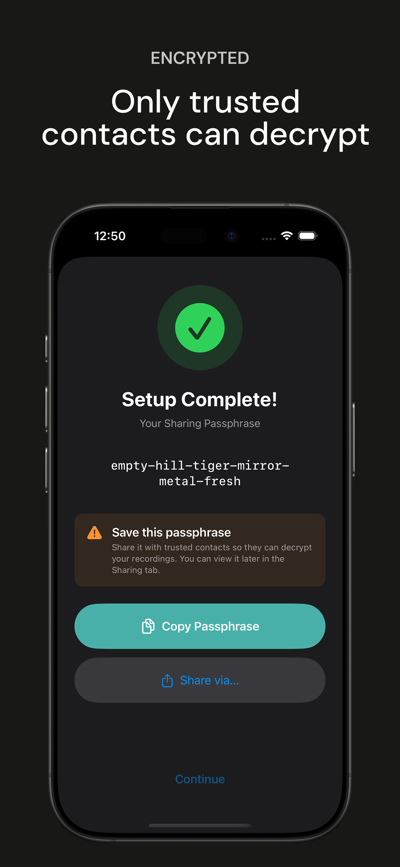
“End-to-end encryption” gets thrown around loosely. For Mockingjay, it means something specific: even with access to your Google account, the footage is unreadable without your password.
Google stores the encrypted blobs. They can’t decrypt them. Law enforcement with a warrant to Google gets encrypted gibberish. This isn’t a bug or oversight—it’s the core security property.
The encryption uses a key hierarchy:
- User password (never stored, only in your memory)
- Password-derived key via PBKDF2 with 600,000 iterations
- Master key encrypted by the derived key, stored locally
- Per-chunk encryption using the master key with unique nonces
The iteration count matters. PBKDF2 intentionally slows down key derivation, making brute-force attacks impractical. 600,000 iterations is the OWASP-recommended minimum for high-value targets. On a modern iPhone, deriving the key takes about a second—annoying enough to notice, fast enough not to matter in practice.
The master key also lives in the Secure Enclave with kSecAttrAccessibleAfterFirstUnlock protection. This enables a feature I call “panic-start.”
Recording Without Friction
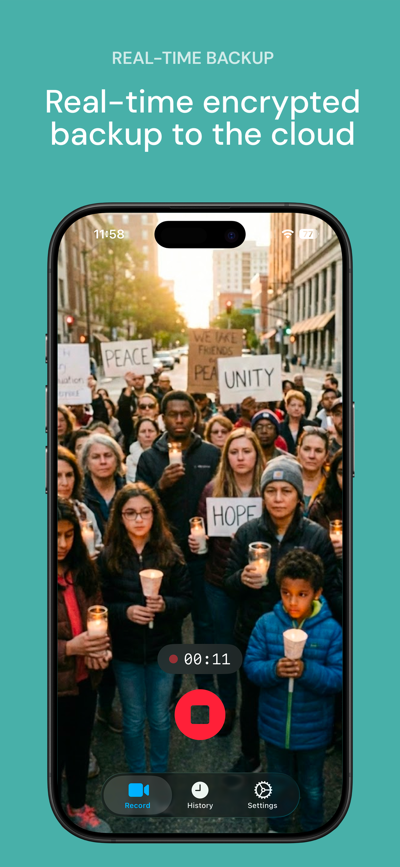
Traditional secure apps require password entry before doing anything. This makes sense for banking apps. For emergency video recording, it’s potentially fatal.
Imagine the scenario: something is happening right now, you need to record immediately, and you’re fumbling with a password field. By the time you’re authenticated, the moment has passed.
Mockingjay’s solution: recording starts without any password. Press the Action Button (or open the app with auto-record enabled), and capture begins immediately. The encryption key loads from the Secure Enclave—hardware-protected storage that’s accessible after the phone’s first unlock without additional authentication.
The password is only required for sensitive actions: viewing recordings, changing settings, stopping a recording in progress. This inverts the usual security model—the PIN protects access to recordings and the ability to stop recording, not the ability to start.
The Duress PIN
Here’s a darker scenario: someone forces you to reveal your PIN. Maybe they’re holding you at gunpoint. Maybe they’re threatening consequences if you don’t comply.
Mockingjay supports a “duress PIN”—a secondary code that appears to work normally but actually triggers a security wipe. When entered:
- All local encryption keys are deleted
- The app shows an empty recording history
- Any footage previously uploaded to the cloud remains there, still encrypted
The adversary sees what looks like a cooperative unlock. There’s nothing suspicious—just an empty app with no recordings. Meanwhile, any footage that was successfully uploaded remains in Google Drive, encrypted with keys that no longer exist on the device.
Recovery happens later on a new device: sign into the same Google account, enter the original password to re-derive the decryption key, and access everything.
Why Not Face ID?
Mockingjay deliberately doesn’t support biometric authentication. This is a feature, not a limitation.
Face ID can be forced. Someone can physically point your phone at your face. In some jurisdictions, courts have ruled that biometric data isn’t protected the same way passwords are—you can be compelled to provide your face, but not your PIN.
PIN-only authentication means the secrets in your head stay in your head. It’s slower and less convenient for everyday use. For the target use cases, that tradeoff is correct.
Choosing Google Drive
I considered building custom server infrastructure. Users would upload to servers I control, and I’d handle storage, redundancy, and access control.
The problems with this approach:
- I become a target. Subpoenas, hacking attempts, pressure to provide backdoors.
- I become a cost center. Video storage is expensive at scale.
- I become a single point of failure. If my servers go down, users lose access.
Google Drive sidesteps all of this. Users authenticate with their own Google accounts. Storage comes from their own quotas. I never see the encrypted data. There’s no server to subpoena because I don’t have one.
The tradeoff is dependency on Google’s infrastructure and policies. But Google Drive is battle-tested, has excellent uptime, and the files are encrypted before leaving the device anyway. Google seeing encrypted blobs they can’t read is acceptable.
Adaptive Quality
Network conditions vary wildly. Recording on a fast WiFi connection is different from recording on a congested cellular network or in areas with poor coverage.
The app monitors upload queue depth and adjusts:
- Queue empty: 3-second chunks at full quality (maximum security, minimum at-risk footage)
- Queue backing up: 10-second chunks (reduce overhead)
- Queue severely backed up: Drop to 480p (prioritize getting something uploaded)
This adaptive behavior means the app degrades gracefully rather than failing completely. On a poor connection, you might get lower-resolution footage with longer chunks. On no connection at all, chunks queue locally and upload when connectivity returns. The alternative—buffering at full quality until the network improves—defeats the entire purpose.
The Manifest Problem
Video players expect a complete file with metadata describing the contents. But Mockingjay uploads chunks during recording—there’s no complete file until recording stops.
The solution is a manifest file that describes the recording: start time, GPS coordinates (if enabled), and metadata for each chunk including its filename, duration, and encryption nonce. This manifest uploads alongside the chunks and gets updated as new chunks complete.
Decryption and playback require downloading all chunks, reading the manifest, decrypting in order, and concatenating into a playable file. I haven’t built a dedicated player yet—currently, decryption outputs standard MP4 files that any video player can handle.
Subscription Model
The free tier limits recordings to 60 seconds. This isn’t arbitrary—it’s enough to demonstrate the core value proposition while creating a clear upgrade path. Users who hit the limit in a real situation understand exactly why unlimited recording matters.
Pro features include unlimited recording time, quality options (480p to 1080p), GPS metadata embedding, custom folder names, and unlimited history retention. RevenueCat handles subscription management, which saved significant development time on receipt validation, family sharing, and platform-specific edge cases.
What’s Next
The current version handles the core use case well. Future improvements I’m considering:
Cross-account redundancy. Automatically share recordings to a trusted contact’s Drive as backup. If your account gets compromised, theirs might not be.
Dead-man switch. If you don’t check in within a specified time, automatically share recordings with designated contacts. Useful for situations where you might not be able to access your phone afterward.
Web-based decryption. Currently, you need the app to decrypt recordings. A web tool would allow access from any device with just your password.
Video integrity proofs. Cryptographic timestamps that demonstrate the footage wasn’t modified after recording. Could help establish authenticity, though admissibility in legal proceedings depends on jurisdiction and other factors.
The Real Test
I hope you never need this app. The ideal outcome is installing it, maybe doing a test recording, and then forgetting it exists because the situations it’s designed for never happen to you.
But if you’re a journalist heading into uncertain territory, an activist planning to document a protest, or anyone who might end up in a situation where your footage matters—it’s there. Recording starts with a single button press. Encrypted chunks flow to the cloud as network conditions allow. The design goal is that footage already uploaded remains safe even if your phone is taken, destroyed, or forcibly unlocked.
No security system is perfect, and uploads depend on network availability. But the architecture addresses a real gap that traditional video apps leave wide open.
Sometimes the most important tool is the one you hope you never have to use.
Mockingjay is available on the App Store.
If you found this interesting, you might also like Building Stao: A Standing Desk Companion That Actually Works—a different kind of side project, but with similar attention to solving a specific problem well.
Comments
Reply on Bluesky here to join the conversation.