Ditching Postman: HTTP Files and Kulala.nvim for API Testing
Postman has a fundamental problem that becomes painful once you work across multiple microservices: it cannot update an imported OpenAPI specification without completely replacing the collection. Every custom script, every environment tweak, every test assertion you wrote against that collection vanishes the moment you need to sync with an updated API spec. For a single monolithic API this might be tolerable, but when you’re managing dozens of services with evolving APIs, the maintenance burden becomes absurd.
I switched to HTTP files. The specification is plain text, version-controlled alongside the code it tests, and trivial for an LLM to generate or update. Combined with Kulala.nvim in my LazyVim setup, I now have a workflow that treats API testing as a first-class part of development rather than a separate tool I context-switch into.
The HTTP File Specification
HTTP files use a straightforward syntax that reads almost identically to raw HTTP requests. A basic GET request looks exactly as you’d expect:
GET https://api.example.com/users/123
Accept: application/json
POST requests with JSON bodies follow the same pattern, with a blank line separating headers from the body:
POST https://api.example.com/users
Content-Type: application/json

{
  "name": "Torstein",
  "email": "[email protected]"
}
Multiple requests live in the same file, separated by ### delimiters. Named requests use ### Request Name syntax, which becomes useful when you need to reference them in scripts or chain them together:
### Create User
POST https://api.example.com/users
Content-Type: application/json

{
  "name": "New User"
}

### Get Created User
GET https://api.example.com/users/{{userId}}
Accept: application/json
The specification supports all standard HTTP methods (GET, POST, PUT, PATCH, DELETE, OPTIONS, HEAD) plus GraphQL, gRPC, and WebSocket requests. Kulala handles the protocol differences transparently.
Variables and Environment Files
Variables transform static request files into reusable templates. Define them inline with @variable=value syntax and reference them with double braces:
@baseUrl = https://api.example.com
@apiVersion = v2

GET {{baseUrl}}/{{apiVersion}}/users
Accept: application/json
For environment-specific values like API keys, base URLs, or authentication tokens, Kulala uses http-client.env.json files. This follows the IntelliJ HTTP Client format, making your files portable across editors that support the specification:
{
	"development": {
		"baseUrl": "http://localhost:8080",
		"apiKey": "dev-key-12345"
	},
	"staging": {
		"baseUrl": "https://staging-api.example.com",
		"apiKey": "staging-key-67890"
	},
	"production": {
		"baseUrl": "https://api.example.com",
		"apiKey": "{{$env.PROD_API_KEY}}"
	}
}
Sensitive values that shouldn’t be committed go in http-client.private.env.json, which you add to .gitignore. Kulala merges both files at runtime, with private values taking precedence.
Dynamic variables generate values at execution time. The specification includes several built-in options:
POST https://api.example.com/events
Content-Type: application/json

{
  "id": "{{$uuid}}",
  "timestamp": "{{$timestamp}}",
  "randomValue": "{{$randomInt 1 1000}}"
}
The $uuid variable generates a new UUID v4 for each request. $timestamp provides the current Unix timestamp. $randomInt generates a random integer within the specified range.
Setting Up Kulala in LazyVim
Add the plugin specification to your lazy.nvim configuration. The minimal setup requires only the opts table to be present:
return {
  "mistweaverco/kulala.nvim",
  keys = {
    { "<leader>Rs", desc = "Send request" },
    { "<leader>Ra", desc = "Send all requests" },
    { "<leader>Rb", desc = "Open scratchpad" },
  },
  ft = { "http", "rest" },
  opts = {
    global_keymaps = false,
    global_keymaps_prefix = "<leader>R",
    kulala_keymaps_prefix = "",
  },
}
Global keymaps remain disabled by default, which I prefer. With this configuration, keymaps only activate when you’re inside an HTTP file buffer. The plugin loads lazily on the http and rest filetypes, keeping startup fast.
For a more comprehensive setup that I use across my projects, the configuration expands to handle multiple display options and additional keymaps:
return {
  "mistweaverco/kulala.nvim",
  keys = {
    { "<leader>Rs", desc = "Send request" },
    { "<leader>Ra", desc = "Send all requests" },
    { "<leader>Rb", desc = "Open scratchpad" },
    { "<leader>Ri", desc = "Inspect request" },
    { "<leader>Rc", desc = "Copy as cURL" },
    { "<leader>Rf", desc = "Search requests" },
  },
  ft = { "http", "rest" },
  opts = {
    global_keymaps = false,
    global_keymaps_prefix = "<leader>R",
    kulala_keymaps_prefix = "",
    default_view = "body",
    split_direction = "vertical",
    default_env = "development",
  },
}
The inspect command opens a floating window showing the parsed request before execution, useful for debugging variable interpolation. The copy as cURL function exports your request to the clipboard as a cURL command, which simplifies sharing with colleagues who haven’t adopted HTTP files yet.
Executing Requests and Viewing Responses
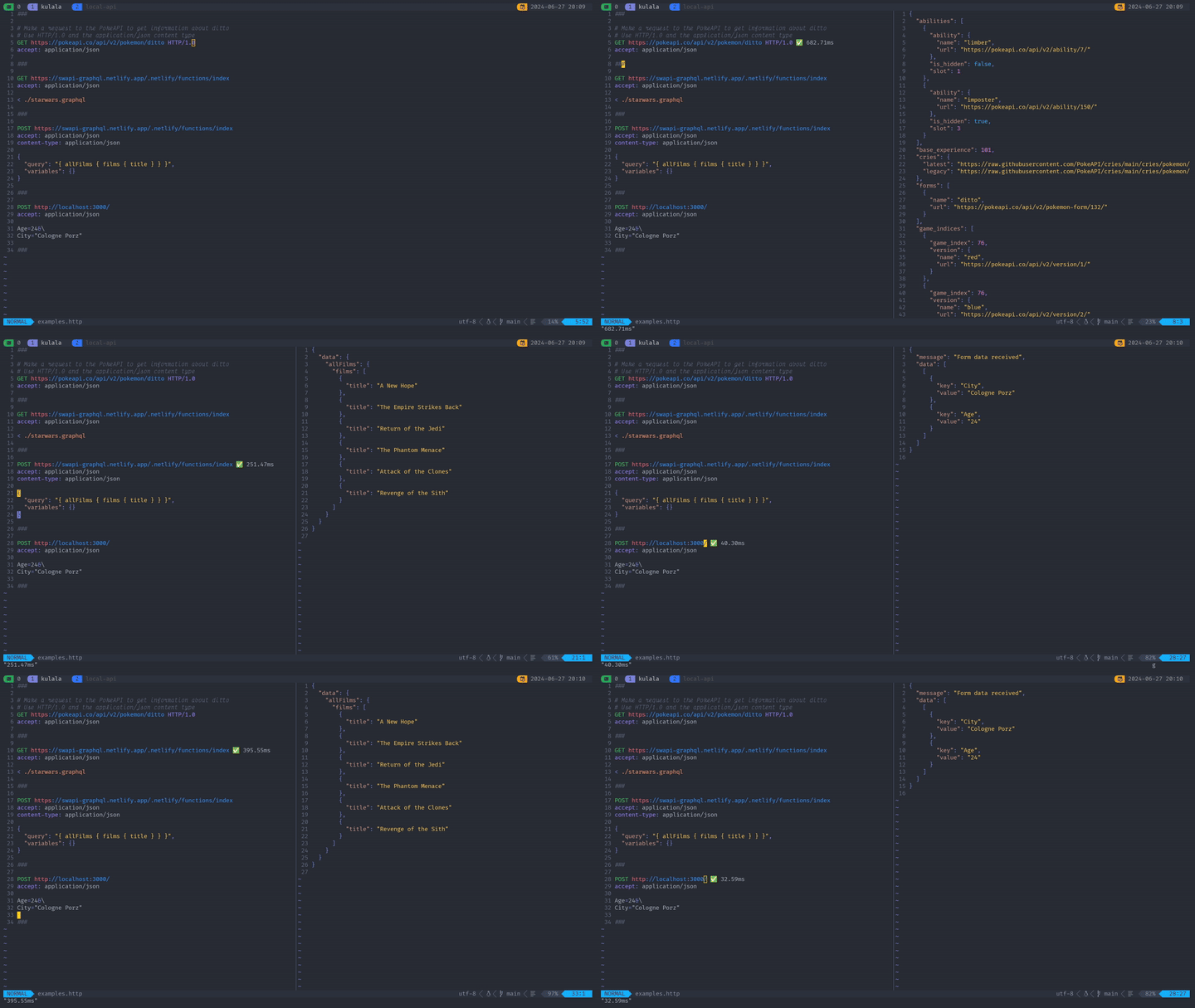
Position your cursor anywhere within a request block and press <CR> (or <leader>Rs with the configuration above) to execute it. Kulala opens a split window displaying the response. The UI provides several views accessible via single-key hotkeys:
Pressing B shows the response body formatted according to its content type. JSON responses get pretty-printed with syntax highlighting. H displays response headers. A shows everything together. V provides verbose output including timing information and the full request/response cycle. S shows performance statistics like DNS lookup time, connection time, and total duration.
Response history persists across requests. Use [ and ] to navigate backward and forward through previous responses. This proves particularly useful when comparing responses after making changes to a request.
For quick experimentation, the scratchpad (<leader>Rb) opens a temporary buffer where you can draft requests without creating a file. The scratchpad content persists across Neovim sessions until you explicitly clear it.
Pre-Request and Post-Request Scripts
Scripts execute before and after requests, enabling authentication flows, response validation, and request chaining. The syntax embeds JavaScript directly in the HTTP file using < {% %} blocks:
### Login and store token
POST https://api.example.com/auth/login
Content-Type: application/json

< {%
  request.variables.set("timestamp", Date.now());
%}

{
  "username": "testuser",
  "password": "{{password}}"
}

> {%
  const json = response.body;
  client.global.set("authToken", json.token);
  client.global.set("userId", json.user.id);
%}

### Get user profile using stored token
GET https://api.example.com/users/{{userId}}
Authorization: Bearer {{authToken}}
Pre-request scripts (using <) run before the request executes. Post-request scripts (using >) run after receiving the response. Variables set with client.global.set() persist across requests, enabling authentication token reuse throughout a session.
For more complex logic, external script files keep HTTP files readable:
### Create order with validation
POST https://api.example.com/orders
Content-Type: application/json

< ./scripts/pre-order.js

{
  "items": [
    {"productId": "123", "quantity": 2}
  ]
}

> ./scripts/validate-order.js
The external JavaScript files have access to the same request, response, and client objects as inline scripts. This separation works well when validation logic grows beyond a few lines.
Authentication Support
Kulala handles the authentication schemes you’ll encounter across enterprise APIs. Basic authentication encodes credentials automatically:
GET https://api.example.com/protected
Authorization: Basic {{username}}:{{password}}
OAuth 2.0 configuration lives in the environment file. Define your OAuth provider settings and Kulala manages the token lifecycle:
{
	"development": {
		"baseUrl": "http://localhost:8080",
		"oauth2": {
			"myAuthProvider": {
				"grantType": "client_credentials",
				"tokenUrl": "https://auth.example.com/oauth/token",
				"clientId": "my-client-id",
				"clientSecret": "{{$env.CLIENT_SECRET}}",
				"scope": "read write"
			}
		}
	}
}
Reference the OAuth token in requests using the special $auth.token() syntax:
GET https://api.example.com/secure-resource
Authorization: Bearer {{$auth.token("myAuthProvider")}}
Kulala automatically fetches and caches the token, refreshing it when necessary. For authorization code flows that require browser interaction, the plugin launches your default browser and intercepts the localhost redirect to capture the authorization code.
Organizing Files Across Microservices
The power of HTTP files emerges when you colocate them with the services they test. I structure my projects with an api/ or requests/ directory at the repository root:
my-service/
├── cmd/
├── internal/
├── api/
│   ├── http-client.env.json
│   ├── http-client.private.env.json
│   ├── users.http
│   ├── orders.http
│   └── auth.http
├── go.mod
└── README.md
Each .http file groups related endpoints. The users.http file contains all user-related requests, orders.http handles order operations, and auth.http manages authentication flows and token generation.
This structure means API documentation travels with the code. When someone clones the repository, they immediately have working examples of every endpoint. The HTTP files serve as executable documentation that stays current because developers update them while implementing features.
For cross-service testing scenarios, I maintain a separate repository with HTTP files that test integration points between services. These files reference multiple base URLs from the environment file and can chain requests across services to verify end-to-end flows.
Generating HTTP Files from OpenAPI
If your services already produce OpenAPI specifications, httpgenerator automates the conversion to .http files. The tool installs as a .NET global tool and accepts either local files or remote URLs:
dotnet tool install --global httpgenerator

httpgenerator ./openapi.json --output ./api/
httpgenerator https://api.example.com/swagger.json --output ./api/
The --output-type flag controls file organization. OneRequestPerFile creates separate files for each endpoint, OneFilePerTag groups by OpenAPI tags, and OneFile consolidates everything. For microservices with clear resource boundaries, OneFilePerTag typically produces the most usable structure.
httpgenerator ./openapi.json \
  --output ./api/ \
  --output-type OneFilePerTag \
  --base-url "{{baseUrl}}"
The --base-url override replaces hardcoded server URLs from the spec with a variable, making the generated files work across environments. Add --authorization-header "Bearer {{token}}" to include authentication headers in every request.
For CI pipelines that generate OpenAPI specs as build artifacts, httpgenerator slots in as a subsequent step. A service that produces its OpenAPI spec during build can immediately generate corresponding HTTP files, ensuring documentation stays synchronized with implementation:
- name: Generate OpenAPI spec
  run: go run ./cmd/openapi-gen > openapi.json

- name: Generate HTTP files
  run: |
    httpgenerator ./openapi.json \
      --output ./api/ \
      --output-type OneFilePerTag \
      --base-url "{{baseUrl}}"

- name: Commit updated HTTP files
  run: |
    git add ./api/*.http
    git diff --staged --quiet || git commit -m "Update HTTP files from OpenAPI"
The --generate-intellij-tests flag adds response assertions to each request, creating runnable test suites that verify endpoints return expected status codes. Combined with CI execution through the JetBrains HTTP Client CLI or Kulala’s GitHub Action, this transforms generated HTTP files into automated API tests.
LLM Integration for Maintenance
HTTP files are text. This obvious fact has significant implications when working with language models. Where httpgenerator handles bulk generation from specs, LLMs excel at surgical updates and custom additions. Ask Claude to add a new endpoint to an existing HTTP file, include specific test scenarios, or add pre-request scripts for authentication flows, and it modifies only what’s needed while preserving surrounding context.
Contrast this with Postman collections, which use a complex JSON structure that LLMs can technically parse but struggle to modify surgically. The simplicity of HTTP file syntax makes it accessible to both humans and language models, reducing the friction when APIs evolve.
I typically use httpgenerator for initial file generation from OpenAPI specs, then rely on LLMs for ongoing maintenance: adding edge case tests, writing pre/post-request scripts, and updating requests when endpoints change in ways not yet reflected in the spec. The generated files provide structure, and LLM edits add the customization that makes them genuinely useful for development.
The Scratchpad for Quick Testing
Sometimes you need to fire off a quick request without creating a file. The scratchpad (<leader>Rb) opens a temporary buffer that persists across sessions. Draft your request, execute it, and iterate until you’re satisfied with the results.
Once the request works, copy it into the appropriate .http file. The scratchpad eliminates the overhead of file management during exploratory testing while maintaining a path to permanent documentation.
Importing from Postman
If you have existing Postman collections, export them and use Kulala’s import functionality. The plugin reads Postman collection JSON and generates equivalent HTTP files. Variables translate to the @variable syntax, environments convert to http-client.env.json entries, and scripts carry over with minor syntax adjustments.
The import handles most straightforward cases automatically. Complex Postman test scripts might need manual conversion to the < {% %} syntax, but the core request definitions transfer cleanly.
Alternatives for Non-Neovim Users
The .http file specification originated with JetBrains, and true compatibility remains limited to tools that explicitly implement their format.
JetBrains IDE users already have the HTTP Client built into IntelliJ IDEA, WebStorm, PyCharm, GoLand, and other JetBrains products. This is the reference implementation that defines the specification. Kulala.nvim explicitly aims for 100% compatibility with the JetBrains HTTP Client, meaning files transfer between Neovim and JetBrains IDEs without modification. The JetBrains implementation adds IDE-specific conveniences like generating requests directly from Spring controller annotations or OpenAPI specifications in your project. If your team includes both Neovim and JetBrains users, the same .http files work for everyone.
For those who want a standalone desktop application without IDE lock-in, I built Kvile to solve exactly this problem. The name comes from Norwegian, meaning “rest.” Kvile supports all three major .http specifications (JetBrains, VS Code REST Client, and Kulala) with automatic format detection, so files from any source work without modification. Built with Tauri instead of Electron, the application weighs around 10MB and uses roughly 40MB of memory compared to Postman’s 150MB+ footprint. It runs entirely offline with no account requirements and no telemetry. The dual editor mode lets you switch between Monaco-based source editing and a visual form editor. Features include environment variables, pre/post-request JavaScript scripting, request history with search, OAuth/OIDC flows, and file watching for external changes. It’s open source under MIT, and I’ll cover the technical journey of building it in a follow-up article.
VS Code users have the REST Client extension by Huachao Mao, which supports .http and .rest files with similar syntax. However, the implementation diverges from the JetBrains specification in some areas. Variable syntax, environment file format, and scripting capabilities differ enough that files may need adjustment when moving between VS Code REST Client and JetBrains/Kulala. The extension remains useful within the VS Code ecosystem, but don’t expect seamless portability. With over 6 million installs, it’s widely adopted, and for teams fully committed to VS Code, the differences won’t matter.
For those who don’t need .http file compatibility specifically, other tools solve the API testing problem differently. Hurl provides a CLI tool written in Rust with its own plain-text syntax optimized for CI/CD pipelines. It includes built-in assertions for response validation, outputting results in JUnit and TAP formats. HTTPie offers a CLI with human-readable syntax and a desktop app in beta, though neither uses .http files. RapidAPI (formerly Paw) gives macOS users a native GUI with Swagger/RAML export capabilities.
The portability argument holds strongest between Kulala and JetBrains IDEs. If your workflow involves multiple editors or team members with different preferences, standardizing on the JetBrains HTTP Client specification through either of these tools ensures your request files remain truly shareable.
What Led Me to Build Kvile
I used HTTP files with Kulala for about a month across several microservices. The core workflow worked well. Pull request reviews started catching API changes because the .http files showed up in diffs. Context switching dropped since I could split my screen between code and HTTP files. New developers onboarded faster by just reading the api/ directory instead of importing Postman collections.
But I kept running into situations where Kulala wasn’t quite right. Demos to colleagues who don’t use Neovim. Quick debugging sessions where launching a full editor felt heavy. Times when I wanted a visual overview of request history or a proper diff between responses. Kulala excels as an editor-integrated tool, but I needed something standalone that still treated .http files as first-class citizens.
That’s what pushed me to build Kvile. It reads the same .http files, supports the same specifications, but runs as a lightweight desktop app. Now I use Kulala when I’m deep in Neovim editing code, and Kvile when I need a dedicated API testing interface. The files stay the same either way.
Comments
Reply on Bluesky here to join the conversation.