Building Kvile: A Lightweight HTTP Client for .http Files
The breaking point came during a routine API update. I had spent an afternoon writing custom test scripts in Postman, carefully crafting pre-request logic and response assertions for a new authentication flow. The next week, the backend team updated the OpenAPI specification with new endpoints. I imported the updated spec into Postman, and every custom script I had written vanished. Postman’s import replaces the entire collection rather than merging changes. Weeks of work, gone.
This wasn’t an isolated incident. Working across multiple microservices means constantly juggling API definitions that evolve independently. The Postman workflow of maintaining collections separately from the codebase creates drift. The collection says one thing, the actual API does another, and nobody notices until something breaks in production.
I had already moved my personal workflow to .http files with Kulala in Neovim, which I wrote about in a previous article. The plain-text format solved the version control problem elegantly. But I still needed a standalone tool for situations where Neovim wasn’t practical: quick debugging sessions, demos to colleagues, or when I wanted a visual representation of complex request flows.
The existing options didn’t fit. Postman and Insomnia consume hundreds of megabytes of memory and require accounts for basic functionality. JetBrains IDEs have excellent HTTP client support, but launching a full IDE to test an endpoint feels excessive. VS Code’s REST Client extension works, but it’s locked to VS Code. I wanted something that treated .http files as first-class citizens without IDE dependencies.
The Vision
Before writing any code, I defined what I actually needed. The tool had to be file-first, treating .http files as the source of truth rather than storing requests in a proprietary database. It had to be lightweight, not another Electron application consuming 500MB of RAM to send a GET request. It had to work offline with no accounts, no telemetry, and no cloud synchronization. And it had to be compatible with files from JetBrains, VS Code REST Client, and Kulala without requiring modifications.
I named it Kvile, the Norwegian word for “rest.” The name fit both the REST API context and my goal of building something relaxed and simple.
Choosing the Stack
Electron was off the table immediately. The memory overhead alone disqualified it, but more importantly, I wanted native performance and a small bundle size. Tauri emerged as the clear alternative. Built on Rust with a WebKit-based frontend, Tauri produces applications around 10MB compared to Electron’s 150MB baseline. The Rust backend handles system operations, file I/O, and HTTP execution, while the web frontend provides the UI layer.
For the frontend, React with TypeScript gave me the productivity I needed. The component model works well for an application with distinct panels (file tree, editor, response viewer), and TypeScript catches errors before they reach users. State management uses Zustand for its simplicity and minimal boilerplate.
The editor presented an interesting choice. Building a text editor from scratch would consume months of development time for an inferior result. Monaco Editor, the engine behind VS Code, provides syntax highlighting, autocompletion, and a familiar editing experience. Integrating it with React required some careful handling of lifecycle events, but the result feels native to anyone who has used VS Code.
For HTTP execution, Rust’s reqwest library handles the actual requests. It’s mature, well-tested, and supports everything from basic requests to complex authentication flows. Request history persists in SQLite using rusqlite, providing fast lookups and search without external database dependencies.
The Parsing Challenge
Supporting multiple .http specifications proved more complex than anticipated. The three major formats share a common foundation but diverge in significant ways.
JetBrains HTTP Client uses ### as request separators and > {% %} blocks for post-request scripts. Environment variables live in http-client.env.json files with a structured format supporting multiple environments. Variable references use double braces: {{variableName}}.
VS Code REST Client defines variables inline with @variableName = value syntax at the top of files. The format lacks the structured environment file approach, instead relying on VS Code settings for environment switching.
Kulala adds extensions like # @name for naming requests and # @prompt for interactive input. These directives appear as comments to other parsers, maintaining backward compatibility while adding functionality.
The parser needed to handle all three without requiring users to specify which format they’re using. The solution involved pattern matching on distinctive syntax elements. Files with @var = value patterns at the top indicate VS Code format. Files with # @name or # @prompt directives indicate Kulala extensions. The presence of http-client.env.json files suggests JetBrains format. In practice, most files work regardless of the detected format since the core HTTP syntax remains consistent.
The parser lives in Rust, accessible to the frontend through Tauri’s IPC mechanism. Each request gets parsed into a structured representation including method, URL, headers, body, pre-request scripts, and post-request scripts. Variables are resolved at execution time, allowing environment switching without re-parsing files.
Features That Emerged
The initial plan focused on basic request execution: open a file, run a request, view the response. User feedback and personal usage revealed gaps that needed filling.
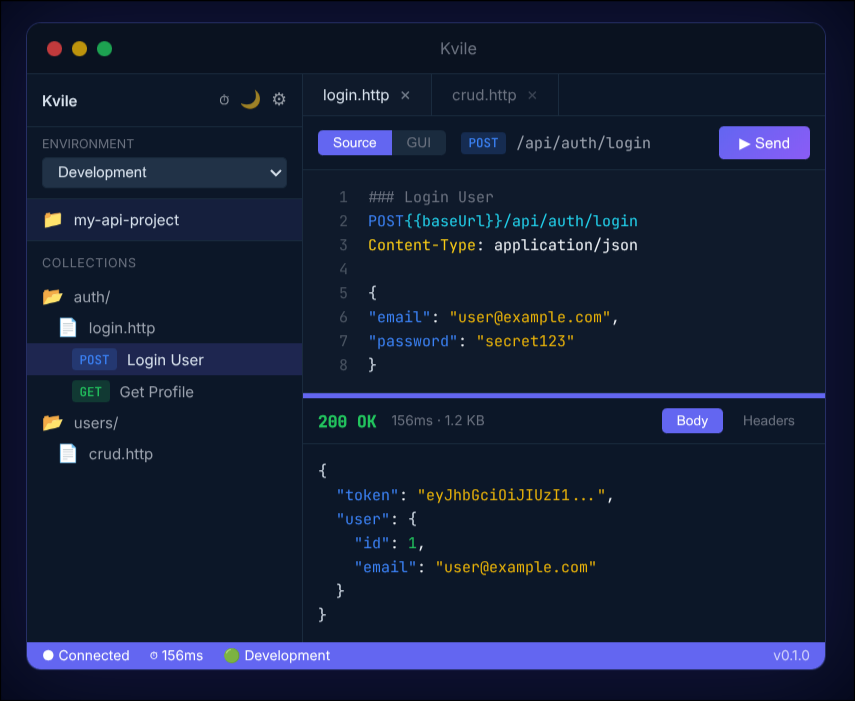
Dual editor mode came from watching colleagues struggle with raw HTTP syntax. Some developers prefer a visual form with labeled fields for method, URL, and headers. Others want direct text editing with full control over formatting. Kvile provides both, synchronized in real-time. Changes in the form editor update the source, and vice versa. The implementation required careful handling of cursor position and selection state to avoid jarring jumps during synchronization.
File watching solved a workflow friction I hadn’t anticipated. When editing .http files in Neovim alongside Kvile, changes made externally weren’t reflected until manually reloading. The file watcher, built with Rust’s notify crate, detects external modifications and updates the editor content. A brief notification indicates when files change, and the user can choose to accept the external changes or continue with the current state.
OAuth and OIDC support addressed enterprise authentication requirements. Many internal APIs use OAuth 2.0 flows that require browser interaction. Kvile spawns a local HTTP server to handle redirect callbacks, captures the authorization code, and exchanges it for tokens. The tokens persist securely and refresh automatically when expired. Supporting multiple OAuth providers per environment required extending the environment file format while maintaining compatibility with JetBrains tooling.
Response diffing emerged from debugging sessions where I needed to compare responses before and after code changes. Selecting two responses from history opens a side-by-side diff view highlighting additions, deletions, and modifications in the JSON structure. The diff algorithm works on the parsed JSON tree rather than raw text, producing meaningful comparisons even when formatting differs.
The command palette provides keyboard-driven access to all functionality. Press Cmd+K (or Ctrl+K on Linux/Windows) to open a searchable list of available commands. Every action accessible through the UI has a corresponding command, and most have dedicated keyboard shortcuts. The implementation uses a simple fuzzy matching algorithm that prioritizes command names and descriptions matching the search query.
Lessons From Tauri
Tauri’s architecture differs significantly from Electron’s, requiring adjustments to mental models formed by previous web development experience.
The IPC boundary between Rust and JavaScript demands explicit thought about data serialization. Complex types need serde annotations for automatic conversion, and large payloads (like file contents) benefit from streaming rather than single transfers. The invoke pattern for calling Rust functions from JavaScript feels natural after initial adjustment, but error handling requires care to propagate meaningful messages to the frontend.
Async patterns in Rust interact with Tauri’s event loop in ways that occasionally surprised me. Long-running operations like HTTP requests with slow responses need proper async handling to avoid blocking the UI. Tauri’s async runtime handles this well, but forgetting to spawn tasks properly results in frozen interfaces.
WebKit rendering varies across platforms more than I expected. Linux with Wayland presented particular challenges, requiring compositor mode adjustments for some systems. The solution involved environment variable detection and automatic workaround application, with manual overrides documented for edge cases.
Platform-specific behaviors extend beyond rendering. macOS expects applications to handle the Dock icon and menu bar integration. Windows requires specific manifest configurations for proper display scaling. Linux desktop integration needs .desktop files with appropriate categories and icons. Tauri handles much of this automatically, but testing on all three platforms revealed subtle differences in behavior.
Current State
Kvile reached version 0.1.0 with core functionality working reliably. Request execution handles GET, POST, PUT, PATCH, DELETE, and other HTTP methods. Environment variables substitute correctly across requests. Pre-request and post-request scripts execute in a sandboxed JavaScript environment with access to request and response data. Request history persists across sessions with full-text search.
The roadmap includes features that emerged from usage but didn’t make the initial release. A collection runner would execute all requests in a file sequentially, producing a report of successes and failures. WebSocket support would extend the tool beyond traditional HTTP to real-time protocols. OpenAPI generation from .http files would reverse the typical workflow, producing specifications from executable examples rather than the other way around.
Performance remains a priority. Startup time currently sits under one second on modern hardware. Memory usage hovers around 40MB during typical usage, spiking only when handling extremely large response bodies. Binary size for the Linux AppImage is approximately 10MB.
The Path Forward
Building Kvile reinforced something I’ve believed for years: developer tools should respect developers’ time and resources. An API client that takes 30 seconds to start and consumes a gigabyte of RAM to send HTTP requests reflects a fundamental misalignment of priorities. The tool exists to serve the developer, not the other way around.
The project is open source under the MIT license. The code lives on GitHub, and downloads are available at kvile.app. I’m actively using Kvile in my daily work, which means bugs get found and fixed quickly. Feature requests and contributions are welcome.
If you work with .http files and want a lightweight alternative to the existing options, give Kvile a try. The learning curve is minimal if you’re already familiar with the file format, and the performance difference compared to Electron-based alternatives is immediately noticeable.
Comments
Reply on Bluesky here to join the conversation.