Android Release Management with GitHub Actions and Fastlane

The Pain of Manual Android Releases
Every Android developer has experienced the release day ritual: manually bumping version numbers, remembering which keystore password goes with which alias, building the APK locally, uploading to the Play Console, then sending a Slack message to let the team know. Multiply this by multiple environments—a beta channel for testers, a production channel for users—and the process becomes error-prone and time-consuming. Someone inevitably forgets to increment the version code, uploads a debug build by accident, or pushes to production when they meant to push to beta.
The industry moved away from manual releases years ago. Modern Android teams expect automated pipelines triggered by git operations, with builds happening on dedicated CI infrastructure rather than developer machines. The standard tooling combination has emerged: GitHub Actions for CI/CD orchestration and Fastlane for Android-specific build automation. This pairing handles everything from running tests on pull requests to uploading signed bundles to the Play Store, all triggered by pushing a git tag.
This guide walks through building such a pipeline from scratch, explaining the decisions behind each component and how they connect into a cohesive release system.
Understanding the Release Lifecycle
Before writing any configuration, consider what a healthy release lifecycle looks like for a mobile application. Most teams converge on a three-environment model that balances rapid iteration with production stability.

The development environment runs on developer machines with debug configurations. Developers build and test locally without needing access to production secrets or signing keys. The beta environment receives builds intended for internal testing and QA. These builds go to Firebase App Distribution (the industry standard for pre-release Android distribution) where testers can install them directly without Play Store involvement. The production environment represents builds shipped to end users through the Google Play Store, starting with internal tracks before gradual rollout to the public.
Each environment transition happens through a deliberate action: creating and pushing a git tag. This creates an audit trail of exactly what code shipped when, and to which channel.
Choosing Your Distribution Strategy
The Android ecosystem offers several paths from compiled code to user devices. Understanding the tradeoffs helps explain why the beta/production split exists.
Firebase App Distribution serves pre-release testing. Google acquired Fabric (which included Crashlytics and Beta) and integrated it into Firebase, making App Distribution the default choice for most teams. Testers receive email invitations, install a small companion app, and can then install any build distributed to their group. The distribution happens outside the Play Store, avoiding the review process and enabling rapid iteration. Builds go out within minutes of the CI pipeline completing.
Google Play Store handles production distribution with its staged rollout capabilities. The internal track lets team members test the exact binary that will ship to users—same signing, same configuration, same Play Store delivery mechanism. Promotion from internal to alpha to beta to production happens through the Play Console or API calls, with percentage-based rollouts protecting against bad releases reaching the entire user base.

This dual-channel approach is industry standard because it addresses different needs. Beta testing requires speed and flexibility—pushing multiple builds per day during active development. Production requires stability and control—careful verification before reaching users, with the ability to halt rollout if problems emerge.
The Version Code Problem
Android enforces a simple rule: every update must have a higher version code than the previous installation. This creates a coordination challenge when distributing the same codebase through multiple channels. If beta build 500 goes to Firebase and production build 500 goes to Google Play, a tester who installed the beta cannot update to production—the version codes match.
The industry solution uses version code namespacing. Beta builds use the raw commit count (a naturally incrementing number), while production builds add a large offset. With a 100,000,000 offset, beta build 825 has version code 825, while production build 825 has version code 100,000,825. The version codes never collide, and production always appears as a newer version than any beta build.

The version name remains human-controlled—semantic versioning like “1.3.9” that marketing and users see. Store this in a configuration file and update it manually when shipping new features. The version code handles the technical requirement of always increasing, derived automatically from git history.
// buildSrc/src/main/kotlin/AppCoordinates.kt
object AppCoordinates {
    // Human-readable version, updated manually for releases
    const val APP_VERSION_NAME = "1.3.9"

    // Machine version, derived from CI environment
    val APP_VERSION_CODE: Int = System.getenv("CI_BUILD_NUMBER")?.toIntOrNull() ?: 1
}
Setting Up Build Configurations
Different environments need different configurations: API endpoints, package names, feature flags, and analytics settings. The naive approach uses Android build variants, creating a combinatorial explosion when flavors multiply. A cleaner approach loads configuration from property files selected at build time.
Each properties file defines the same keys with environment-appropriate values:
# config/dev.properties
app.package.name=com.example.myapp.dev
app.server.url=https://api-dev.example.com
sentry.enabled=false
feature.debug_menu=true
# config/beta.properties
app.package.name=com.example.myapp.beta
app.server.url=https://api-staging.example.com
sentry.enabled=true
feature.debug_menu=trueProduction configuration contains sensitive values—real API keys, production endpoints—that should never exist in version control. The CI pipeline writes this file from a GitHub Secret before building.
A property loader reads the appropriate file based on a build parameter, with environment variables taking precedence for CI overrides:
// buildSrc/src/main/kotlin/PropertyLoader.kt
object PropertyLoader {
    private val properties = mutableMapOf<String, String>()

    fun load(buildConfig: String, projectDir: File) {
        val propsFile = File(projectDir, "config/$buildConfig.properties")
        if (propsFile.exists()) {
            Properties().apply {
                load(propsFile.inputStream())
            }.forEach { key, value ->
                properties[key.toString()] = value.toString()
            }
        }
    }

    fun get(key: String): String? {
        // Environment variables override file values
        val envKey = key.uppercase().replace(".", "_")
        return System.getenv(envKey) ?: properties[key]
    }
}
Gradle references these properties to configure the build:
// app/build.gradle.kts
val buildConfig: String by project.properties.withDefault { "dev" }
PropertyLoader.load(buildConfig, project.rootDir)

android {
    defaultConfig {
        applicationId = PropertyLoader.get("app.package.name")
            ?: "com.example.myapp.dev"

        buildConfigField("String", "SERVER_URL",
            "\"${PropertyLoader.get("app.server.url")}\"")
        buildConfigField("boolean", "SENTRY_ENABLED",
            "${PropertyLoader.get("sentry.enabled") ?: false}")
    }
}
Building with different configurations requires only a Gradle property:
./gradlew assembleRelease -PbuildConfig=beta
./gradlew bundleRelease -PbuildConfig=prod
Implementing Secure Signing
Android requires cryptographic signing for release builds. The signing configuration represents one of the most security-sensitive parts of the release pipeline—a leaked production keystore means attackers could publish malicious updates to your users.
The debug keystore can live in the repository. Every developer uses the same debug keystore, ensuring consistent behavior during local development. Credentials are intentionally simple:
android {
    signingConfigs {
        getByName("debug") {
            storeFile = file("keystore.debug")
            storePassword = "android"
            keyAlias = "debug"
            keyPassword = "android"
        }
    }
}
The production keystore never touches version control. Store it as a base64-encoded GitHub Secret, decoded to a temporary file during CI builds:
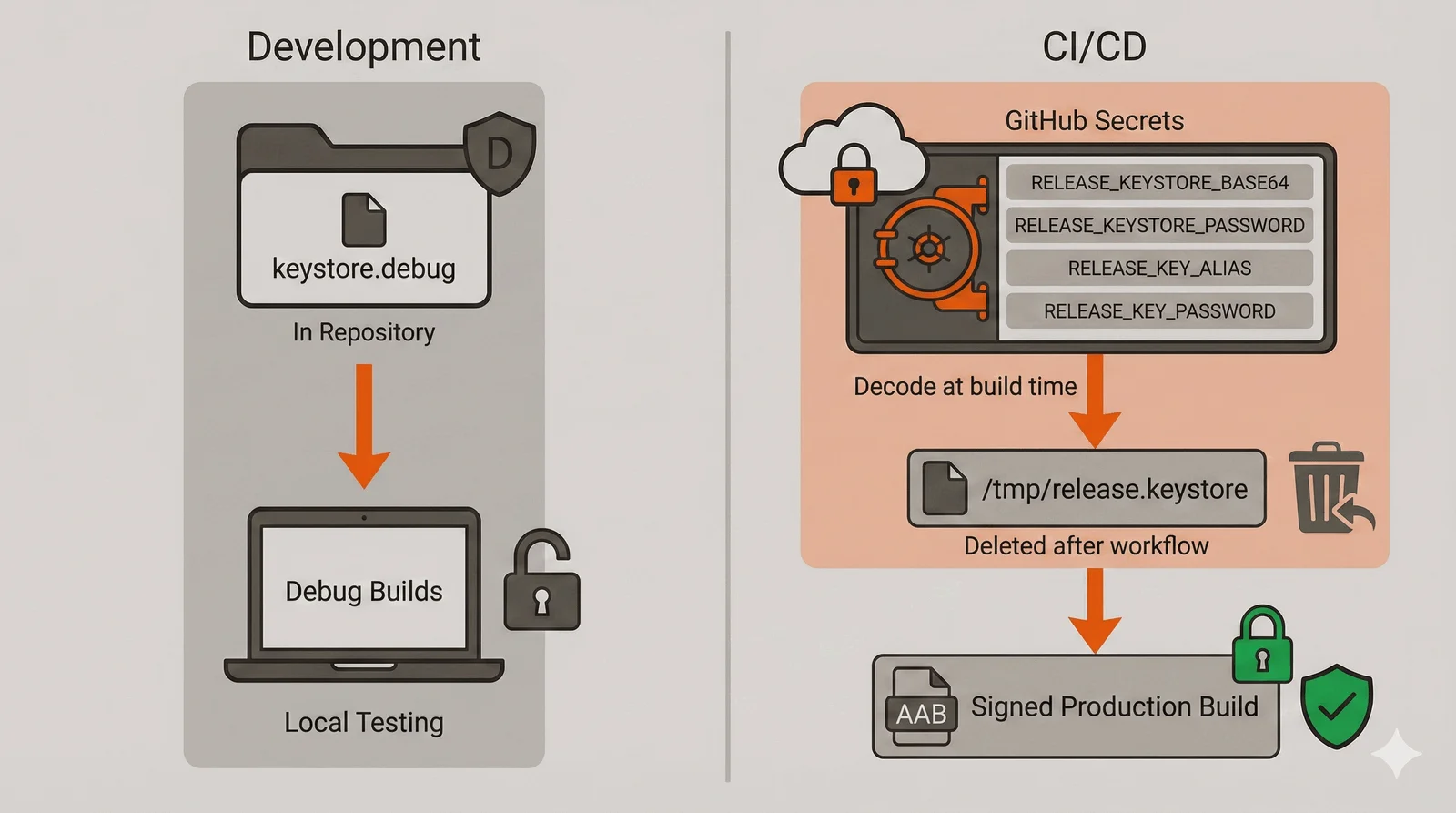
The Gradle configuration conditionally applies release signing when environment variables exist:
android {
    signingConfigs {
        create("release") {
            val keystorePath = System.getenv("RELEASE_KEYSTORE_PATH")
            if (keystorePath != null) {
                storeFile = file(keystorePath)
                storePassword = System.getenv("RELEASE_KEYSTORE_PASSWORD")
                keyAlias = System.getenv("RELEASE_KEY_ALIAS")
                keyPassword = System.getenv("RELEASE_KEY_PASSWORD")
            }
        }
    }

    buildTypes {
        release {
            signingConfig = if (System.getenv("RELEASE_KEYSTORE_PATH") != null) {
                signingConfigs.getByName("release")
            } else {
                signingConfigs.getByName("debug")
            }
            isMinifyEnabled = true
            isShrinkResources = true
        }
    }
}
Beta builds through Firebase can use the debug keystore—testers install directly, and App Distribution handles the trust model. Production builds require the release keystore because Google Play verifies signing consistency across updates.
Configuring Fastlane
Fastlane emerged as the industry standard for mobile build automation. Originally an iOS tool, it now handles Android equally well. Fastlane abstracts Gradle commands, version management, store uploads, and notifications into declarative “lanes” that read like deployment scripts.
Install Fastlane through Bundler for reproducible builds:
# fastlane/Gemfile
source "https://rubygems.org"

gem "fastlane"
# fastlane/Pluginfile
gem 'fastlane-plugin-firebase_app_distribution'The Fastfile defines lanes for each deployment target. Each lane represents a complete workflow from source to distribution:
# fastlane/Fastfile
default_platform(:android)

platform :android do

  desc "Run unit tests"
  lane :test do
    gradle(task: "testDebugUnitTest")
  end

  desc "Deploy beta build to Firebase App Distribution"
  lane :beta do
    # Derive version code from git history
    build_number = sh("git rev-list --count HEAD").strip
    ENV["CI_BUILD_NUMBER"] = build_number

    # Generate changelog from commits since last production release
    changelog = changelog_from_git_commits(
      between: [last_git_tag(pattern: "prod/*"), "HEAD"],
      pretty: "- %s",
      merge_commit_filtering: "exclude_merges"
    )

    # Build APK with beta configuration
    gradle(
      task: "assemble",
      build_type: "Release",
      properties: { "buildConfig" => "beta" }
    )

    # Upload to Firebase
    firebase_app_distribution(
      app: ENV["FIREBASE_APP_ID"],
      groups: "internal-testers",
      release_notes: changelog
    )

    # Notify the team
    slack(
      message: "Beta #{build_number} shipped to Firebase",
      slack_url: ENV["SLACK_WEBHOOK_URL"]
    )
  end

  desc "Deploy production build to Google Play Store"
  lane :production do
    # Production version code with offset
    commit_count = sh("git rev-list --count HEAD").strip.to_i
    build_number = 100_000_000 + commit_count
    ENV["CI_BUILD_NUMBER"] = build_number.to_s

    # Build AAB with production configuration
    gradle(
      task: "bundle",
      build_type: "Release",
      properties: { "buildConfig" => "prod" }
    )

    # Upload to Play Store internal track
    upload_to_play_store(
      track: "internal",
      json_key: ENV["PLAY_STORE_JSON_KEY_PATH"],
      skip_upload_metadata: true,
      skip_upload_images: true
    )

    slack(
      message: "Production #{build_number} uploaded to Play Store internal track",
      slack_url: ENV["SLACK_WEBHOOK_URL"]
    )
  end

end
Fastlane handles the changelog generation automatically—extracting commit messages between the last production tag and HEAD provides testers with context about what changed.
Building the GitHub Actions Workflows
GitHub Actions orchestrates the pipeline, responding to repository events and executing the appropriate Fastlane lanes. The workflow structure mirrors the release lifecycle: pull request validation, beta deployment, and production deployment.
Pull Request Workflow
Every pull request triggers validation. This catches issues before code merges:
# .github/workflows/pr-validation.yml
name: PR Validation

on:
  pull_request:
    branches: [main]

concurrency:
  group: pr-${{ github.event.pull_request.number }}
  cancel-in-progress: true

jobs:
  validate:
    runs-on: ubuntu-latest
    steps:
      - uses: actions/checkout@v4

      - uses: actions/setup-java@v4
        with:
          java-version: '17'
          distribution: 'temurin'
          cache: gradle

      - name: Run tests and lint
        run: |
          ./gradlew testDebugUnitTest
          ./gradlew detekt
The concurrency setting cancels in-progress runs when new commits push to the same PR, avoiding wasted compute on outdated code.
Beta Release Workflow
Beta releases trigger on tags matching canary/v*. The workflow sets up Ruby for Fastlane, decodes Firebase credentials, and runs the beta lane:
# .github/workflows/beta-release.yml
name: Beta Release

on:
  push:
    tags: ['canary/v*']

jobs:
  deploy:
    runs-on: ubuntu-latest
    steps:
      - uses: actions/checkout@v4
        with:
          fetch-depth: 0 # Full history for changelog generation

      - uses: actions/setup-java@v4
        with:
          java-version: '17'
          distribution: 'temurin'
          cache: gradle

      - uses: ruby/setup-ruby@v1
        with:
          ruby-version: '3.2'
          bundler-cache: true
          working-directory: fastlane

      - name: Decode Firebase credentials
        run: |
          echo "${{ secrets.FIREBASE_SERVICE_ACCOUNT_BASE64 }}" \
            | base64 --decode > firebase-credentials.json

      - name: Deploy to Firebase
        env:
          FIREBASE_APP_ID: ${{ secrets.FIREBASE_APP_ID }}
          GOOGLE_APPLICATION_CREDENTIALS: firebase-credentials.json
          SLACK_WEBHOOK_URL: ${{ secrets.SLACK_WEBHOOK_URL }}
        run: cd fastlane && bundle exec fastlane beta
Production Release Workflow
Production releases require more secrets and use GitHub Environments for approval gates:
# .github/workflows/production-release.yml
name: Production Release

on:
  push:
    tags: ['prod/v*']

jobs:
  deploy:
    runs-on: ubuntu-latest
    environment: production # Requires approval if configured

    steps:
      - uses: actions/checkout@v4
        with:
          fetch-depth: 0

      - uses: actions/setup-java@v4
        with:
          java-version: '17'
          distribution: 'temurin'
          cache: gradle

      - uses: ruby/setup-ruby@v1
        with:
          ruby-version: '3.2'
          bundler-cache: true
          working-directory: fastlane

      - name: Setup credentials
        run: |
          echo "${{ secrets.RELEASE_KEYSTORE_BASE64 }}" \
            | base64 --decode > /tmp/release.keystore
          echo "${{ secrets.PLAY_STORE_JSON_KEY_BASE64 }}" \
            | base64 --decode > play-store-key.json
          echo "${{ secrets.PROD_PROPERTIES }}" > config/prod.properties

      - name: Deploy to Play Store
        env:
          RELEASE_KEYSTORE_PATH: /tmp/release.keystore
          RELEASE_KEYSTORE_PASSWORD: ${{ secrets.RELEASE_KEYSTORE_PASSWORD }}
          RELEASE_KEY_ALIAS: ${{ secrets.RELEASE_KEY_ALIAS }}
          RELEASE_KEY_PASSWORD: ${{ secrets.RELEASE_KEY_PASSWORD }}
          PLAY_STORE_JSON_KEY_PATH: play-store-key.json
          SLACK_WEBHOOK_URL: ${{ secrets.SLACK_WEBHOOK_URL }}
        run: cd fastlane && bundle exec fastlane production
The environment: production setting enables protection rules. Configure the production environment in repository settings to require approval from designated reviewers before the workflow executes.
The Complete Release Flow
With all components in place, releasing becomes a matter of creating and pushing tags:

The tag-based trigger creates a clear audit trail. Every release maps to a specific tag, which maps to a specific commit. Rolling back means deploying a previous tag. Investigating issues means checking which tag deployed when.
Managing Secrets
The pipeline requires numerous secrets. Organize them by purpose and document their source:

Encode binary files with base64 before storing as secrets:
base64 -w 0 release.keystore > release.keystore.b64
base64 -w 0 play-store-key.json > play-store-key.b64
# Copy contents of .b64 files into GitHub Secrets
The -w 0 flag prevents line wrapping, producing a single line suitable for GitHub Secrets’ input field.
Industry Practices and Recommendations
Several patterns have emerged as best practices across the Android development community.
Tag-based releases provide better control than branch-based triggers. A push to main could trigger a release, but this removes the deliberate decision to ship. Tags require explicit creation, providing a moment to verify readiness. Tags also enable releasing any commit, not just HEAD—useful for hotfixes on older versions.
Separate signing keystores per environment adds security. If the beta keystore leaks, attackers cannot push malicious updates to production users. Some teams use different keystores for each Play Store track (internal, alpha, beta, production) though this adds operational complexity.
Environment protection rules for production releases prevent accidents. Requiring approval from a second team member before production deployment catches mistakes and provides accountability. GitHub Environments integrate this directly into the workflow.
Immutable build artifacts ensure the binary tested is the binary shipped. Build once, deploy to beta for testing, then promote the same artifact to production. Some teams achieve this by storing APK/AAB files as workflow artifacts and passing them between jobs, though Firebase and Play Store APIs make re-uploading straightforward.
Automated changelog generation keeps release notes current without manual effort. Conventional commit formats (feat:, fix:, chore:) enable structured changelogs that categorize changes by type.
Build caching dramatically reduces CI times. Gradle’s configuration cache and dependency cache, combined with GitHub Actions’ cache storage, can cut build times from 15 minutes to 5 minutes on large projects. The savings multiply across hundreds of PR builds per week.
Extending the Pipeline
The foundation described here supports numerous extensions. Crash reporting services like Sentry need ProGuard mapping files uploaded alongside production releases—Fastlane plugins handle this automatically. Screenshot testing with tools like Paparazzi can run during PR validation, catching visual regressions before merge. Play Store metadata (descriptions, screenshots, changelogs) can deploy through Fastlane’s supply tool, keeping store presence version-controlled alongside code.
The pipeline architecture scales from small applications to large modular codebases. Adding modules increases build time but the fundamental workflow remains unchanged: validate on PR, deploy beta on canary tags, deploy production on prod tags. The combination of GitHub Actions for orchestration and Fastlane for Android-specific operations handles the complexity while remaining maintainable as requirements evolve.
Comments
Reply on Bluesky here to join the conversation.